C64 Dev Machine V1.41 PRO+LITE - C64 ULTIMATE Ready!
1.3.9: C64 Dev Machine now in German (Deutsch)!
C64 Dev Machine now speaks German! In 1.3.9 you can run the whole editor in Deutsch, including all of the 6502 ACADEMY. The menus are also sorted into clearer sections, and PRO users get new MCP music tools for their AI helper.
Jetzt auf Deutsch!
DEUTSCH: every menu, button, panel and message is in German. Choose it when you first start the Dev Machine, or switch at any time in OPTIONS > LANGUAGE, which now has its own section: English, Deutsch and Chinese.
6502 ACADEMY auf Deutsch: all 100 lessons and all 5 exams are translated, code comments included. Switch language and the ACADEMY opens in the new one.
Umlauts in every font: Ä, Ö, Ü and ß are in all of the editor's fonts. Each one is built from that font's own letters, so they fit the style.
Der C64 Dev Machine ist jetzt komplett auf Deutsch, mit allen 100 Lektionen und 5 Prüfungen der 6502 ACADEMY. Viel Spaß beim Programmieren!
Clearer menus
OPTIONS and PROJECT are now sorted into sections, with slim sub headers in every dropdown, so things are easier to find.
MCP music tools (PRO, Windows)
Your AI helper can now check, trace, export and import Music Maker songs as SID files. The MCP badge, its help and the helper itself now follow the language you choose.
Also in 1.3.9
FIXED: a Music Maker pattern step saved without a note no longer crashes the editor.
1.3.9 is out for Windows and macOS, PRO and LITE.
SHARE your Custom Code blocks in the Discord user-code-blocks channel.
SUPPORT the development by leaving a review on itch and buying the PRO version. Thank you for your support!
Files
Get C64 Dev Machine V1.41 PRO+LITE - C64 ULTIMATE Ready!
C64 Dev Machine V1.41 PRO+LITE - C64 ULTIMATE Ready!
A C64 + C64 Ultimate Node and Code Development tool
| Status | Released |
| Category | Tool |
| Author | polytricity |
| Tags | assembler, coding, Commodore 64, dev, engine, game, maker, mcp, programming, Retro |
More posts
- C64 Dev Machine 1.4.1: MIX colours9 hours ago
- 1.4.0: from C64 Engine to the Dev Machine1 day ago
- 1.3.8: DUNGEON, a still HUD over the scroll, and our own packer8 days ago
- 1.3.7: KUMITE, rainbow sprite trails and code editor OPTIONS9 days ago
- 1.3.6: our own emulator, and a school for 650213 days ago
- C64 Dev Machine 1.3.5 is out: Windows and macOS, PRO and LITE.18 days ago
- C64 Dev Machine 1.3.4: Spawn layer and a big Music Maker update20 days ago
- C64 Dev Machine 1.3.3 is out (Windows & macOS)23 days ago
- MacOS Version is ready33 days ago
Comments
Log in with itch.io to leave a comment.
Forgive me if this is something obvious, but how do I remove (delete) elements from the UI? Say I drag the wrong element in and want to get rid of it. So far I haven't been able to find it. Is there undo?
Can you give a screenshot of what you mean, since elements can be removed with the red button
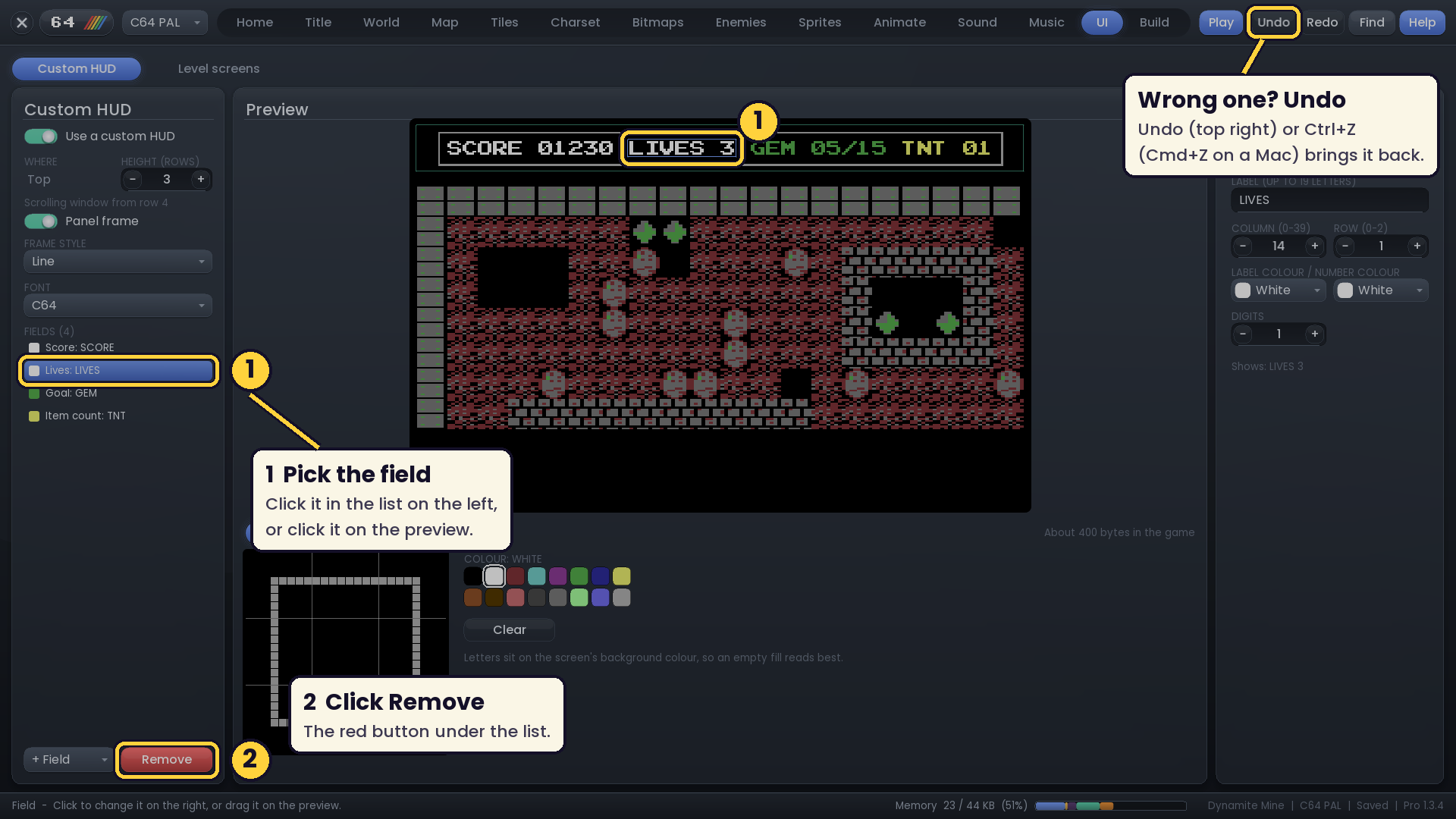
and Undo should work...
Is that screenshot from your other project, C64 Engine? I supported that also but haven't tried it out yet.
Here is a screenshot of a new project in C64 Dev Machine, with a new address label added (by pressing 'A'). How would I remove that yellow label, should I wish to do so? It's probably pretty elementary but I haven't quite found it so far.
Just a further comment: by habit, I've been right-clicking on things expecting to get a context menu on screen. That doesn't seem to be the approach you've taken. That is 100% your call, but it's a pretty common idiom you might consider for future development. Cheers!
Double right click to remove nodes.
Right click alone on a node is not really used yet (although I could have it as an option... I like it! but as long as you can still pan..which you can with space, middle mouse, or right mouse button..), it is used to pan the view port currently, macros have an [INFO] at the top right you hover over for context, and op codes you hover over them on the left panel.
I will add to next version. thanks
Yeah, can do. Next update will have that in place, thanks for the feedback.