Nice idea for a games creator. I haven't tried it out properly though. If games are made from this tool, will the games need to be classed as AI assisted or no AI used? This is just incase I get time to make something using this tool and upload it sometime in the future?
Anything made in this is no different form say a game made in S.E.U.C.K or Unreal Engine, Unity Etc. It's simply a tool. You have full control and direction of what you create here, even if you plan to make something commercially, obviously don't try to ship the games as they stand in the editor itself, I made them a bit rough on purpose graphically, it's your job to make them awesome, I will play my part by improving C64 Engines features within reason.
A few suggestions for C64Engine: Issue to fix -> When playing Jump Quest, the player disappears off the top of the screen, could you look into this?
Would it be possible to add the following features : - Copy/paste a selected area within the map editor. - Import a map (CharPad, *.BIN, *.CTM) along with its tileset, color map, and charset. - Import sprites (SpritePad, *.BIN, *.SPD). Thanks for your help!
I bought C64 Engine Pro and mine looks like the image below. Where is the template button? Why does mine look so different from yours? Am I missing something simple? Thanks.
Pressing CTRL+0 will make the scaling auto, you should see everything then. Fixing now to make that the default. Thanks for the report, hopefully that sorts it.
I re-downloaded the newest version just now and installed it. I also changed from Auto to 100% and still no template option between home and screen on the top menu and no pictures in the How it works tabs. I'm on Windows 10, my resolution is 1920 x 1080. I never tried your free version, I just went straight to the paid version, but don't see why it would look and not have the same screen layout as yours.
Okay, spent some more time on it this morning, was late last night when I attempted to fix it, sorry about that.. 1.2.1 has the proper fix in place, now its 2 header tabs you click to expand. I tested on my little mac book and older 1080p laptop and looks correct now.
Thanks again for the testing and reporting. Please keep them coming, I have not had enough time to properly test everything and will make everything perfect in each new update.
I already fixed some issues with the games but found some more, so expect another update on this next week.
Please note to macOS users, I am updating VICE, so you don't have to locate your own version (3.9 is the preferred one). I am trying to integrate it now, like I did with C64 Dev Machine. Fix will be in the next hour or 2.
Hi there. Apologies if these were already addressed, but is it possible to make an all character-set based game, and also, are 2-player games possible?
C64 sprites are 24 x 21 pixels Multi colour or Hi-res, Multicolour uses 2 pixels wide but supports 3 colours, Hi-Res is just one colour. I could support 2x1 or 1x2 sprites for horizontal and vertical and make a kind of template that makes use of these later.
Purchased both C64Engine Pro and C64 Dev Machine PRO, basically just wanted the C64Engine Pro but after playing around with the program for a while and being highly impressed with the application, I thought it would be a great idea to also support the C64 Dev Machine development. C64Engine Pro requests would be isometric game environments and racing (chase HQ/outrun) style racers. Keep up the great work thank you.
Thank you so much for the support. I am making very significant improvements to C64 Engine today and will have a nice update soon. Racing car template will be something I can add in the coming weeks.! Thanks for these ideas and suggestions.
Awesome, I'll be buying this too. As with ADAM I'd love to see support for creating isometric games with runtime depth sorting so that characters can move in front of or behind objects, support for different elevations, isometric collision detection and an isometric tile editor.
Multi layered tile maps with support for animated tiles would also be great.
Anyway, I'm looking forward to seeing how this and your other tools develop over time.
C64 Engine is limited for complete beginners who want to avoid coding very much at all, it does have a logic system that will give you a decent about of coding control and there will be more built-in tutorials added around that for the next update so you feel like you are coding without the complexities of having to learn machine code.
C64 Dev machine is a full hard-core dev-suite that covers a very wide spectrum and far more flexible and can make byte and cycle-exact games just like other Commodore 64 Development tools. It supports text based coding via Code-Blocks which are editable in the pro version.
Both have FREE lite versions and bespoke tours/how to use tutorials so you can give them a go and see for yourself what one you prefer.
Thank you for the prompt reply, it is good info that I either missed or isn't so clear on the project pages.
I'm thinking of making a C64 game next as my current project is finally getting close after only 3 years and two engine changes LOL I think C64 Dev Machine fits my needs better as I will be able to get going faster and fill in my missing knowledge along the way so I am certainly going to try Lite at some point to evaluate it.
Also you commented about C64 Dev Machine under C64 Engine. If you are talking about C64 Engine, there is a display percentage setter button under game settings.
← Return to tool
Comments
Log in with itch.io to leave a comment.
Nice idea for a games creator. I haven't tried it out properly though. If games are made from this tool, will the games need to be classed as AI assisted or no AI used? This is just incase I get time to make something using this tool and upload it sometime in the future?
Anything made in this is no different form say a game made in S.E.U.C.K or Unreal Engine, Unity Etc. It's simply a tool. You have full control and direction of what you create here, even if you plan to make something commercially, obviously don't try to ship the games as they stand in the editor itself, I made them a bit rough on purpose graphically, it's your job to make them awesome, I will play my part by improving C64 Engines features within reason.
Can I ask where the Logic tab has gone on some of the templates, I can't see the tab for it?
Literally just replied to your question... Still in the process of consolidating the logic for those. Next update will have them. thanks.
Awesome work you're doing.
Hi Polytricity,
You’re always doing great work!
A few suggestions for C64Engine:
Issue to fix -> When playing Jump Quest, the player disappears off the top of the screen, could you look into this?
Would it be possible to add the following features :
- Copy/paste a selected area within the map editor.
- Import a map (CharPad, *.BIN, *.CTM) along with its tileset, color map, and charset.
- Import sprites (SpritePad, *.BIN, *.SPD).
Thanks for your help!
Will do, will likely get to this next week.
I bought C64 Engine Pro and mine looks like the image below. Where is the template button? Why does mine look so different from yours? Am I missing something simple? Thanks.
Looking into it now...
Pressing CTRL+0 will make the scaling auto, you should see everything then. Fixing now to make that the default.
Thanks for the report, hopefully that sorts it.
This is to do with screen scaling, fixing it now but for now try pressing CTRL+0 (zero)
Redownload for some extra fixes to the games. I still have more to fix with them but a forgivable little glitches for now.
I re-downloaded the newest version just now and installed it. I also changed from Auto to 100% and still no template option between home and screen on the top menu and no pictures in the How it works tabs. I'm on Windows 10, my resolution is 1920 x 1080. I never tried your free version, I just went straight to the paid version, but don't see why it would look and not have the same screen layout as yours.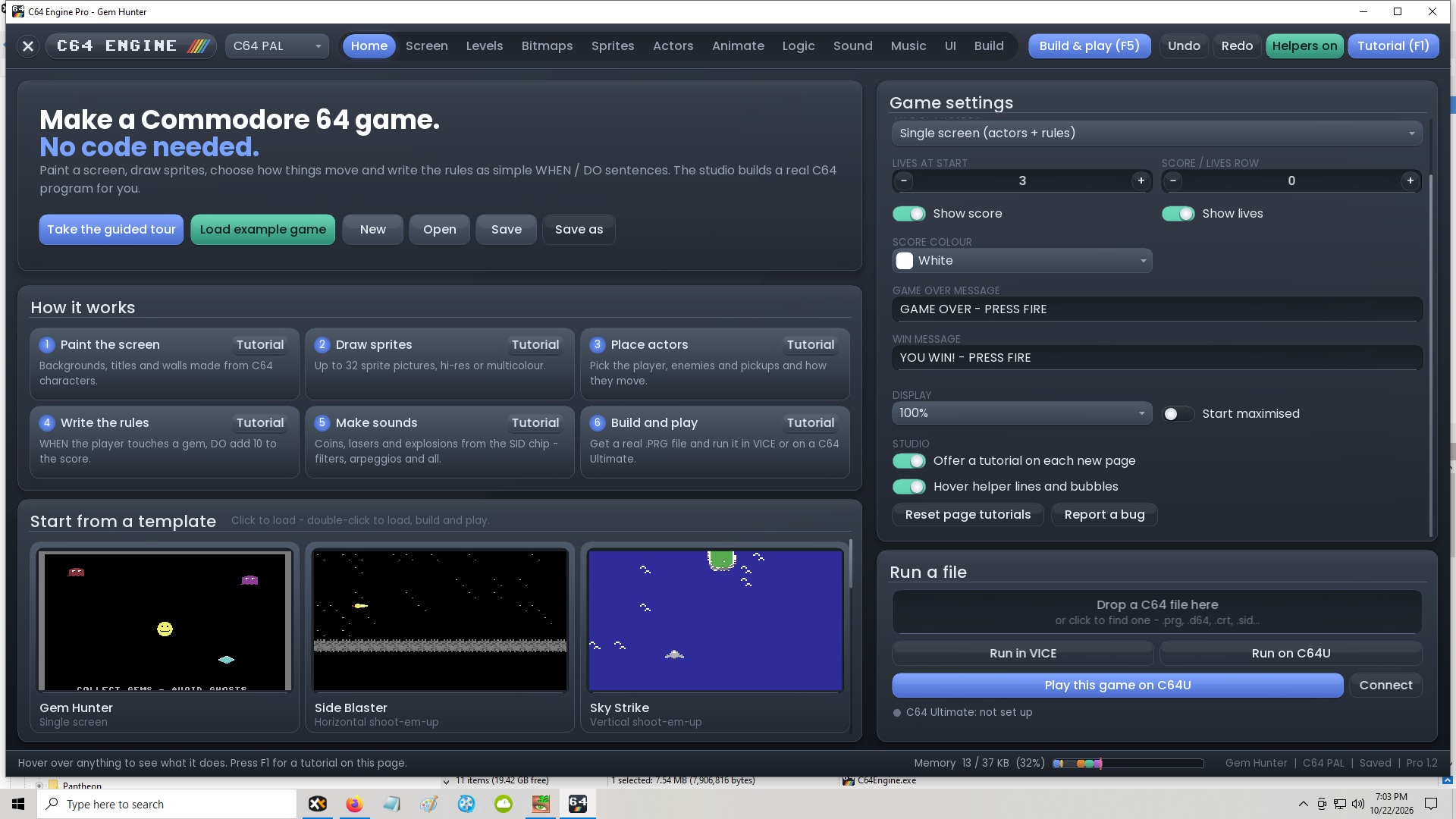
Will make a better fix today.
Okay, spent some more time on it this morning, was late last night when I attempted to fix it, sorry about that.. 1.2.1 has the proper fix in place, now its 2 header tabs you click to expand.
I tested on my little mac book and older 1080p laptop and looks correct now.
Thanks again for the testing and reporting. Please keep them coming, I have not had enough time to properly test everything and will make everything perfect in each new update.
I already fixed some issues with the games but found some more, so expect another update on this next week.
Thanks so much!
Thanks, much better. Just wanted to know if "Templates" should be there between Home and Screen on the top menu bar, since it doesn't appear in mine?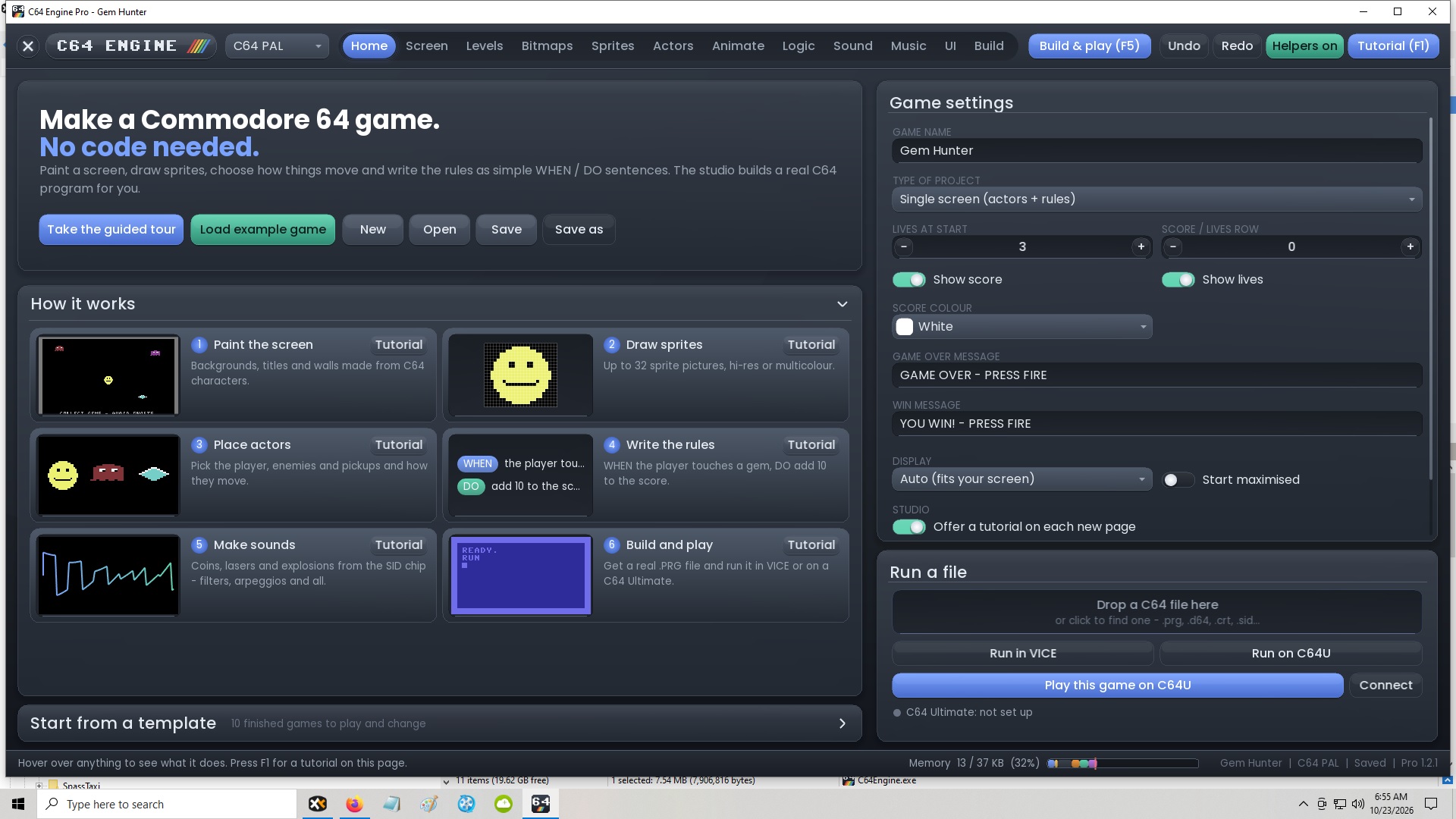
It was there at one point and I removed it since it was in Home Screen but I will re-add it.
Thanks.
Please note to macOS users, I am updating VICE, so you don't have to locate your own version (3.9 is the preferred one). I am trying to integrate it now, like I did with C64 Dev Machine. Fix will be in the next hour or 2.
Hi there. Apologies if these were already addressed, but is it possible to make an all character-set based game, and also, are 2-player games possible?
Hi, it's not been asked yet, the tool is undergoing improvements to the current features, once done I will get to this, adding to the list. Thanks
Only 2-player taking turns to begin with, simultaneous 2-player will need a bit more thought at my end.
Any plan for a native Linux version?
I don't have a Linux machine to build on or do debugging etc, sorry however crossover and wine should work.
Is it possible to make 16x32 player sprites?
C64 sprites are 24 x 21 pixels Multi colour or Hi-res, Multicolour uses 2 pixels wide but supports 3 colours, Hi-Res is just one colour.
I could support 2x1 or 1x2 sprites for horizontal and vertical and make a kind of template that makes use of these later.
Purchased both C64Engine Pro and C64 Dev Machine PRO, basically just wanted the C64Engine Pro but after playing around with the program for a while and being highly impressed with the application, I thought it would be a great idea to also support the C64 Dev Machine development. C64Engine Pro requests would be isometric game environments and racing (chase HQ/outrun) style racers. Keep up the great work thank you.
Thank you so much for the support. I am making very significant improvements to C64 Engine today and will have a nice update soon. Racing car template will be something I can add in the coming weeks.! Thanks for these ideas and suggestions.
Awesome! I look forward to the updates and future developments.
Do you plan to make a Mac OS X version ?
Will sort that this week, today if possible.
Yes please! MacOS Version would be intstant buy 😎
Awesome, I'll be buying this too. As with ADAM I'd love to see support for creating isometric games with runtime depth sorting so that characters can move in front of or behind objects, support for different elevations, isometric collision detection and an isometric tile editor.
Multi layered tile maps with support for animated tiles would also be great.
Anyway, I'm looking forward to seeing how this and your other tools develop over time.
Yes, isometric has already started in the background, should be complete by next month all going well, for all both ADAM and C64Engine.
Thanks.
Awesome, great to hear. Many thanks!
Can you explain the difference between C64 Dev Machine and this please?
C64 Engine is limited for complete beginners who want to avoid coding very much at all, it does have a logic system that will give you a decent about of coding control and there will be more built-in tutorials added around that for the next update so you feel like you are coding without the complexities of having to learn machine code.
C64 Dev machine is a full hard-core dev-suite that covers a very wide spectrum and far more flexible and can make byte and cycle-exact games just like other Commodore 64 Development tools. It supports text based coding via Code-Blocks which are editable in the pro version.
Both have FREE lite versions and bespoke tours/how to use tutorials so you can give them a go and see for yourself what one you prefer.
Thanks
Thank you for the prompt reply, it is good info that I either missed or isn't so clear on the project pages.
I'm thinking of making a C64 game next as my current project is finally getting close after only 3 years and two engine changes LOL I think C64 Dev Machine fits my needs better as I will be able to get going faster and fill in my missing knowledge along the way so I am certainly going to try Lite at some point to evaluate it.
I can't use the C64 Dev Machine, is it possible to make the font ui size bigger? 4pt. is just to eye straining for these old eyes
You know you can zoom in with mouse-wheel or page up, for the Nodes at least.
Also you commented about C64 Dev Machine under C64 Engine.
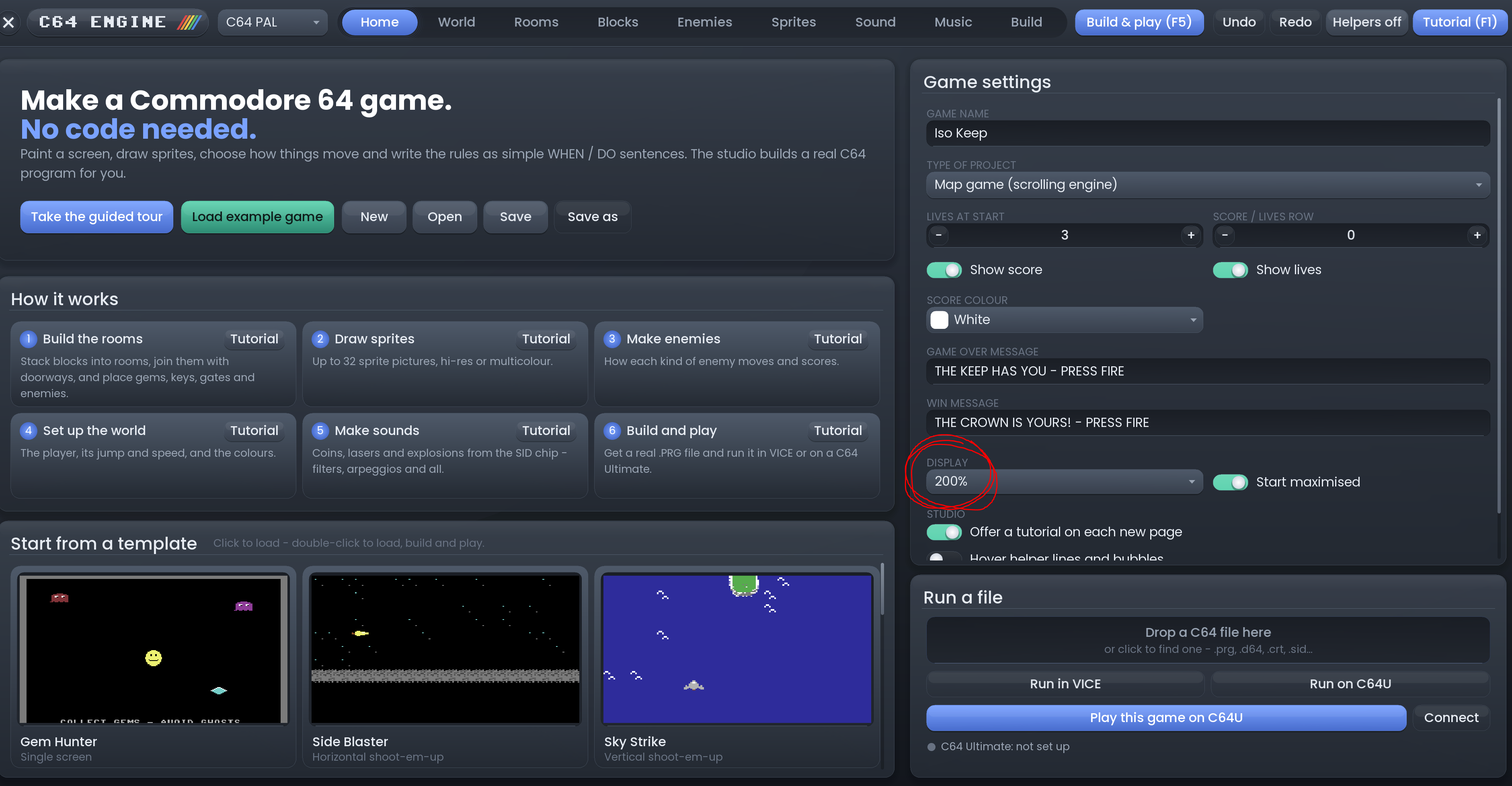
If you are talking about C64 Engine, there is a display percentage setter button under game settings.
ahh, the engine, thank you!!